Send email from an alias in Outlook
Turn on sending from aliases in Exchange Online, add an alias and choose it as the sender in Outlook on the web. Plus addressing is covered too.

7 min readNew

A multifunction printer that emails scans, a reporting server that sends an overview every night, an old application that sends notifications: many of those devices and apps send mail through Exchange Online with a username and password. Microsoft had announced that this way of signing in would be rejected step by step from March 2026. On 27 January 2026 Microsoft replaced that schedule with a new timeline.
In this blog post you read what the new timeline means, how to find out which accounts still use Basic authentication, and which routes Microsoft names for moving away from it.
Updated in October 2026: added what Microsoft says about authentication policies with the per-mailbox setting, the cloud environment in which High Volume Email is available, the date range of the SMTP AUTH Clients report, and what Microsoft says about modern mail clients.
SMTP AUTH, also called authenticated client SMTP submission, is the way a client signs in to Exchange Online to send mail, usually over TCP port 587. Microsoft names two groups of users: POP3 and IMAP4 clients, which cannot send mail themselves, and applications, reporting servers and multifunction devices that generate mail.
SMTP AUTH supports two ways of signing in: Basic authentication (username and password) and OAuth. Only Basic authentication goes away. The protocol itself stays.
According to Microsoft, virtually all modern mail clients, such as Outlook, Outlook on the web and Outlook for iOS and Android, do not use SMTP AUTH to send mail.
The original announcement assumed a first small percentage of rejected sign-ins on 1 March 2026 and 100 percent on 30 April 2026. That schedule has been replaced by the updated timeline:
| When | What happens |
|---|---|
| Until December 2026 | Basic authentication for SMTP AUTH works as it does now |
| End of December 2026 | Basic authentication for SMTP AUTH is off by default in existing tenants. An administrator can turn it back on if needed |
| Tenants created after December 2026 | Basic authentication for SMTP AUTH is not available by default. OAuth is then the supported method |
| Second half of 2027 | Microsoft announces the final date on which Basic authentication for SMTP AUTH goes away |
According to Microsoft, the timeline applies to tenants in all cloud environments. The announcement does not yet say which setting turns Basic authentication back on after December 2026.
💡 Note: the new timeline gives more time, but the end of Basic authentication for SMTP AUTH is still planned. Use the time until December 2026 to move away from it.
The SMTP AUTH Clients report shows which accounts use SMTP AUTH and with which sign-in method.
Senders with Basic Auth in the chosen period (up to 90 days) still use a username and password. Those can be devices, apps, scripts or users’ POP and IMAP clients. Senders that send less often may not show up here.
According to Microsoft, the mail flow reports, and with them this report, are not available in the GCC High and DoD environments.
If an app or device can use OAuth, that is the route Microsoft points to. Microsoft describes how that works in Authenticate an IMAP, POP or SMTP connection using OAuth. For an app that sends mail without a user, these are the steps in short; Microsoft’s page has the details:
New-ServicePrincipal. Use the Object ID of the app under Enterprise applications for this, not the one under App registrations.Add-MailboxPermission to the mailbox the app sends from. If the app sends as another address (SendAs), the service principal also needs Add-RecipientPermission.Microsoft does not say whether a printer or scanner supports OAuth; check that with the device’s vendor.
📚 In the documentation on the deprecation of Basic authentication, Microsoft also names the Microsoft Graph API as another way to send authenticated mail.
For apps and devices that have to keep using Basic authentication, Microsoft names these alternatives in the original announcement:
Apart from the sign-in method, Microsoft recommends turning off SMTP AUTH for the whole organization and turning it on only for the mailboxes that still need it. The per-mailbox setting takes precedence over the organization setting.
This command turns off SMTP AUTH for the whole organization:
# Disable SMTP AUTH for the whole organization
Set-TransportConfig -SmtpClientAuthenticationDisabled $true
This command turns SMTP AUTH back on for one mailbox, for example a scanner’s mailbox:
# Allow SMTP AUTH for one mailbox, overriding the organization setting
Set-CASMailbox -Identity scanner@contoso.com -SmtpClientAuthenticationDisabled $false
If the authentication policy that applies to the account blocks Basic authentication for SMTP, signing in with a username and password through SMTP AUTH still fails, even when SMTP AUTH is on for the mailbox.
In the Exchange admin center you find the organization setting as Turn off SMTP AUTH protocol for your organization on the Mail Flow page under Settings. Per user, the setting is in the Microsoft 365 admin center under Users > Active users, at Mail > Manage email apps as Authenticated SMTP.
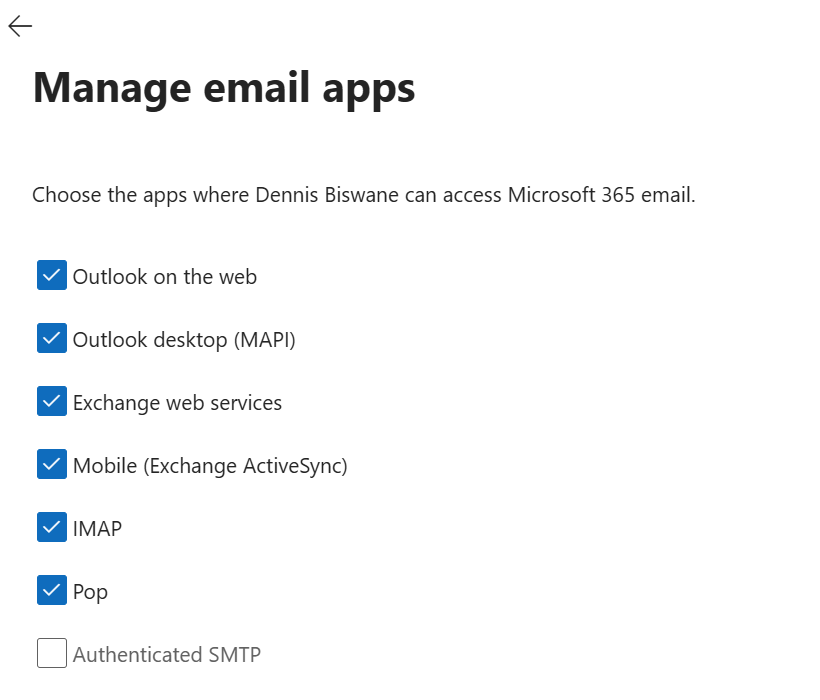
💡 If security defaults are on in your tenant, SMTP AUTH is already disabled in Exchange Online.
According to Microsoft, virtually all modern mail clients that connect to Exchange Online, such as Outlook, do not use SMTP AUTH to send mail; for users of such a client nothing changes. You notice the difference with devices and apps that still send with Basic authentication through SMTP AUTH. If Basic authentication is off by default at the end of December 2026 and they have not been moved by then, it stands to reason that their sign-in fails until an administrator turns Basic authentication back on, insofar as the per-mailbox setting, authentication policies and security defaults allow it.
With the new timeline, Microsoft gives you until the end of December 2026. Use the SMTP AUTH Clients report to see which accounts still use Basic authentication, move what you can to OAuth, and choose one of the alternatives Microsoft names for the rest.