Administrator protection and the Windows 11 baselines
From the October update, the Security Compliance Toolkit baselines turn on Administrator protection. How to decide with Intune where it goes on.
- Topic: Intune
- Topic: Windows
- Platform: Windows

4 min readNew

A work app stuck on failed, a device that does not fetch its apps and settings again, Windows Update that keeps failing: over my career as an IT administrator, I collected scripts for problems like these, for various clients: my own scripts and community scripts I used over the years. They worked, but they stayed loose scripts.
Today the first public release of Endpoint Toolbelt is out. It is my first app, grown from those scripts. I had Claude analyse them and rebuild them as one app, extended considerably with what more it can do. The app explains why a work app won’t install, and what the user cannot fix themselves goes to IT with evidence. In this post you read what the app does, who it is for and how to start.
Endpoint Toolbelt is a Windows app that lets employees and IT support see why something does not work on a device managed with Microsoft Intune, and fix the known causes themselves. Users run a fixed set of repairs without administrator rights: a small Windows service does the work that needs rights. It asks for confirmation and keeps to the limits the administrator sets, such as how often an action may run.
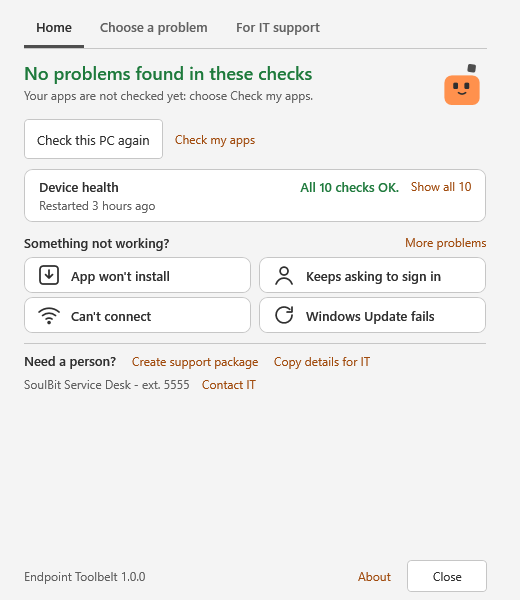
What the app can do:
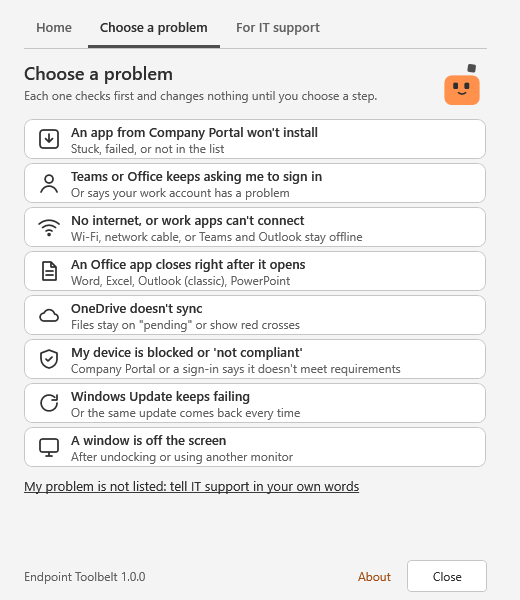
💡 Good to know: the app has no server of its own and sends no telemetry. There is no central overview for IT either: IT sees what the user passes on.
For organizations that manage their Windows devices with Intune, and for their IT support. IT support has a tab of its own with every tool, the device report and the history of each run. The device runs Windows 10 22H2 or Windows 11, 64-bit, and is enrolled in Intune. The app is in English only. On hybrid-joined devices, Windows in a language other than English and a proxy-only network it is not confirmed yet.
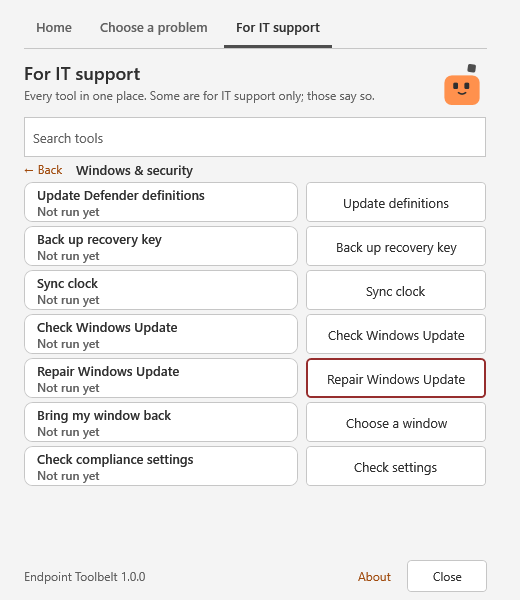
📚 How to test, package, assign and configure the app step by step is in Install Endpoint Toolbelt.
💡 Note: if you use the ASR rule that blocks files based on prevalence and age, it can hold back a new release in its first days. The guide on ASR rules shows how to allow Endpoint Toolbelt.
The source code is on GitHub under the MIT licence. There you can:
I’m happy to read them.
That did not go without trial and error. Many checks behaved differently than you would expect, so it was test, fine-tune and try again. Maybe a bit too perfectionist, but there it is. I also built a website for it and set up GitHub.
AI did a lot of the work, but everything around it still took me quite a few evenings, next to my regular work. The end result is something I’m proud of. Now I’m curious what the community does with it.